
Category: Product News

Deleting Tasks on Import Now Possible!

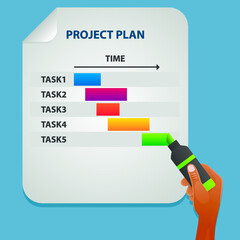
A hand highlights a colorful Gantt chart on a project plan sheet, showing five tasks with progress bars indicating timelines and how to ppo delete tasks, against a blue background.

One of the most valued features of PPO is the ability to import tasks from Microsoft Project (MSP) or Excel into PPO’s task entity with a couple of clicks. This ensures that Project Managers are not expected to give up their favorite planning tools when using PPO, the integration works smoothly, however there has been one drawback – PPO did not delete tasks that have been deleted in Microsoft Project (MSP) or Excel.

Missing Interaction, Us Too … But We Are Ready To Help!

Purple line drawing of a person with a headset and microphone, surrounded by arrows, a phone receiver, and a speech bubble, symbolizing PPO Live Chat Support or call center communication.

Visitors to the Project Portfolio Office web site may already be familiar with our purple Live Chat bubble, lower right hand corner of their screens, but for those of you that haven’t, don’t fret, we are introducing our Live Chat directly in PPO!

Project Team Member Leaving? Traditionally a Pain!

White icon of three people in front of a screen or board, inside a purple circle, representing a group presentation, meeting, or training session.

Traditionally when a team member leaves a project before it is completed it’s a pain! Over and above a change to the project team dynamics and relationships, just trying to get a handle on what the team member is involved with, the background and history of each item, the next steps and accessing any documentation is often a time-consuming activity.

New powerful filter control for PPO

ppo_filter_control

We are thrilled to unveil the latest enhancement to the PPO user interface which we believe is the best yet! All lists / tables in PPO now have a single, powerful filter control which replaces the previous list criteria dropdown boxes.

Visualise your data with colour coded custom lists & percentage fields

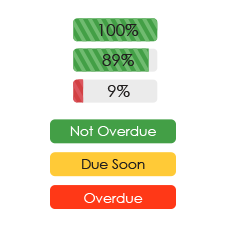
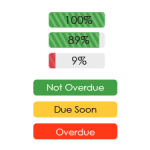
Three progress bars show 100%, 89%, and 9%. Below them are three labels: “Not Overdue” in green, “Due Soon” in yellow, and “Overdue” in red, indicating task statuses.

We are pleased to introduce our new more colourful percentage fields as well as colour coded custom list items. All percentage fields now show a graphical representation of the percentage with positive percentages showing in green and negative percentages in red.  The absolute value is also highlighted by showing it as a “progress bar”, allowing you to identify items requiring attention at a glance.

New skins and custom skin functionality

Illustration of a computer monitor with website design elements, surrounded by icons of gears, a globe, envelope, light bulb, code, and stationery, representing web development and digital creativity.

We are excited to announce the ability for users to create their own custom skins / colour schemes in PPO. This allows users to create a look for PPO that they find aesthetically pleasing or that matches their corporate colours. In line with this we have also streamlined the number of “standard” skins that are provided.

Our brand new login page

PPO Login Screen
We hope that you love our new login page as much as we do!  There is actually more to it than meets the eye and it showcases a lot of the changes that you will start seeing elsewhere in PPO. Side banner The most obvious change is the introduction of a side banner which allows … Continue reading "Our brand new login page"