
Category: Articles

Things to consider when introducing Timesheets

Illustration of an analytics dashboard with bar and pie charts, a calendar, a clock, and user profile icons. Some progress bars are shown in different colors indicating various completion levels.

It’s common practice for the project management office (PMO) to be tasked with introducing timesheets for the organisation’s projects. Irrespective of why timesheets are required, we’ve put together a few things for the PMO to consider.

Three common mistakes in strategy execution (and how to avoid them)

A woman with braided hair, wearing a dark blazer and light blue shirt, smiles confidently at the camera against a plain white background.

Effective project portfolio management (PPM) practices are crucial to survival for organisations faced with an uncertain economic and political climate. South African strategy executive, Leabetswe Bomvana looks at three common mistakes many businesses make when it comes to the execution of strategy, making her recommendations on how to overcome these.

Dashboards Receive a Major Upgrade

Two colorful donut charts compare planned hours by category, separated by a purple diagonal line. A tooltip on the right chart highlights “Business Architecture Blueprint,” showing 144 planned hours (36.2%).

Today we have deployed the new PPO dashboards with an improved chart component which now includes new graph types (activity, gullet and gauge graphs) and support for drill down, click throughs, zoom and much much more…

Simplifying Task Imports and Supporting Mac & Google Sheet Users

Three illustrated user avatars appear beside horizontal progress bars and checklists, indicating progress and completed tasks. One bar shows 100% completion with a flag, and other items are partially checked or colored.

Over time however we saw more and more users moving away from complex scheduling tools like MSP and thus we allowed users to make use of an Excel template to create simple project plans and import this into PPO. Today we are releasing a new template for Google Sheet users and a dramatically simplified Excel template that can be used by both Window and Apple users in a much simpler way.

Introducing Board Views: A new PPO feature in data visualisation

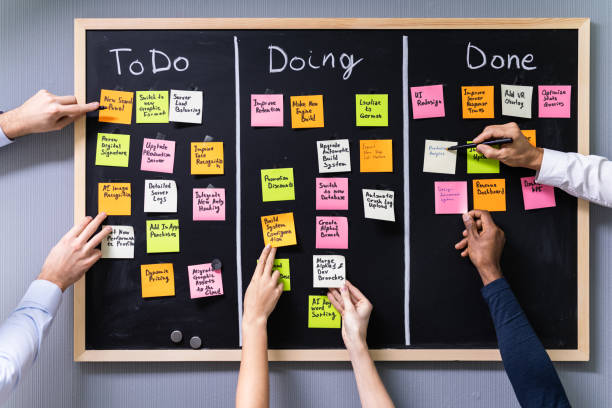
Hands placing and moving colorful sticky notes on a blackboard divided into three columns labeled To Do, Doing, and Done, representing a team project management workflow.

Today we are excited to announce the launch of another great feature, Board Views. This innovative addition to PPO will transform the way users interact with and visualise their data, offering a seamless and dynamic experience that empowers organisations to make more informed decisions.

Quickly check when items were Last Updated!

Illustration of a calendar with icons around it, including an envelope, a clock, a bell, and an exclamation mark, representing reminders, notifications, and scheduling.

We recently deployed the ability to use date fields for filtering on list pages in PPO by using various pre-defined date filters. We have now further enhanced this feature to allow the ability for you to see when last something was updated in PPO by using the Last Updated date field!

Share your lists & stand a chance to win!

Illustration of three cartoon avatars next to progress bars and checklists, with text: Win a voucher & treat yourself to an item in your Wish Lists! and a purple arrow pointing at the avatars and lists.

Send us a video, screen shot and/or description of how you’re using “My Lists” in PPO to mylists@go2ppo.com and stand a chance to win a voucher and treat yourself to an item in one of your “Wish Lists”!

Even the small enhancements have huge impact!

A computer monitor displays multiple overlapping dashboard screens with charts, graphs, and data visualizations, all branded with the acme logo, against a gradient purple background.

We’ve made a number of huge enhancements over the past few months (Copy from Entity View, Send to Feed Business Rule, Calendar, My Lists & Bar Chart Widgets) but we’ve also released a few smaller enhancements this month that you might’ve missed! These enhancements (while small), we know will help to improve your user experience.